.svg)
Why Appearance and Protection Shops Live or Die by Before-and-After Photos (And How to Manage Them)
A repeatable photo workflow for detailing, tint, wrap, PPF, and ceramic shops to document condition, prevent disputes, and market work.

.png)
Helping auto shops work smarter and grow.
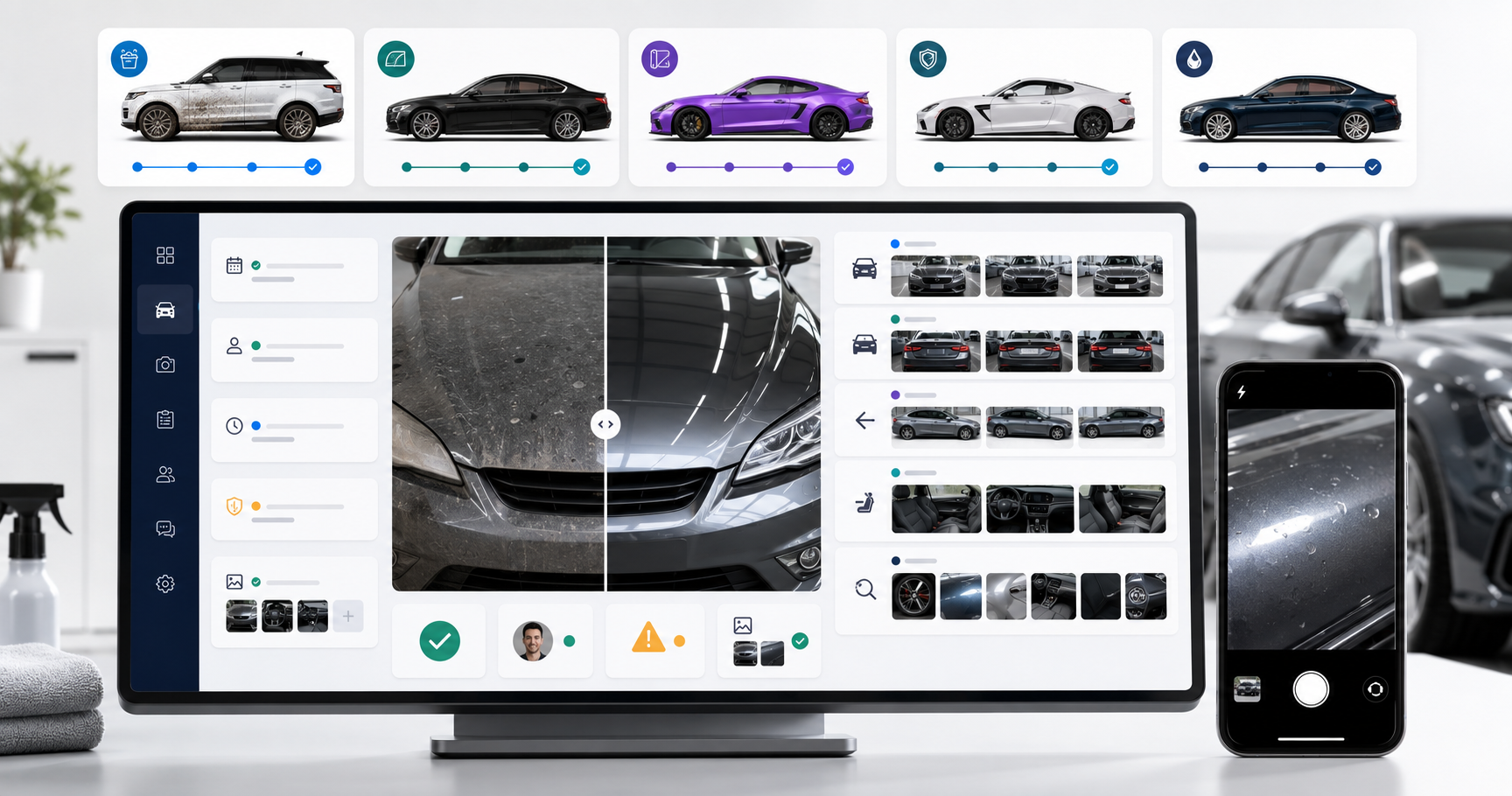
In detailing, tint, wrap, PPF, and ceramic work, the customer is buying a visible outcome. If the shop cannot show the starting condition, approved scope, process, and finished result, it loses both sales proof and protection when a disagreement appears. A repeatable photo system turns each job into a documented record that supports approvals, quality control, customer communication, and future marketing.
Why are before-and-after photos essential for appearance shops?
Appearance services are hard to evaluate from a service name alone. “Paint correction,” “full-front PPF,” or “premium detail” tells the customer what was purchased, but not what changed. Photos make the condition and result concrete.
Before photos establish the baseline. They show scratches, chips, dents, stains, peeling film, wheel damage, glass damage, trim condition, warning lights, and personal items present at intake. Process photos can document a customer-approved change, hidden issue, removed part, film edge, contamination, or correction limit. After photos show the completed scope and the vehicle’s release condition.
This is also how prospective customers judge visual work. Real detailing galleries commonly organize actual before-and-after examples by interior, exterior, correction, or protection service. JAG’s Auto Detail, for example, uses paired before-and-after work to show the care and outcome customers can expect. See JAG’s published detailing gallery.
OXMotive lets the team capture job photos in the mobile app and tie them to the customer and service history. The useful part is not only storage. It is knowing which vehicle, date, service, approval, and employee the image belongs to.
What is a repeatable before-and-after photo routine for every job?
Consistency matters more than taking dozens of random images. Use the same walk-around path, camera orientation, and required angles for every intake. First Underwriters recommends a systematic walk-around and consistent photo sequence for documenting pre-existing damage. Its guidance includes four-corner and full-side views, plus specific damage images. See the pre-existing damage documentation guide.
Use this checklist:
- Confirm the customer, vehicle, service, date, and marketing-consent status.
- Clean the camera lens and use the highest practical image quality.
- Capture front-left, front-right, rear-left, and rear-right three-quarter views.
- Capture both full sides, front, rear, roof, hood, wheels, glass, and interior areas relevant to the job.
- Photograph the odometer, warning lights, and fuel or charge level when part of the shop’s intake policy.
- Take wide, medium, and close views of every visible defect or concern.
- Record existing chips, scratches, dents, stains, tears, peeling film, damaged trim, and loose items.
- Capture reference images for tint shade, wrap placement, PPF coverage, coating condition, or design approval.
- Take process photos when hidden conditions or scope changes appear.
- Repeat the key angles after service in similar position and lighting where possible.
- Complete final quality-control photos before the vehicle leaves.
- Store originals with the job and create separate marketing copies only with permission.
Assign ownership. The intake person captures the baseline, the installer captures process exceptions, and the final inspector completes release images. OXMotive can keep the sequence inside the customer record, so photos do not remain scattered across personal camera rolls and group chats.
How should photos be tied to the customer and job record?
A folder named “black BMW” is not a reliable record. Use the customer, vehicle, job number, service date, service type, and photo stage. Each image should be identifiable as before, approval, process, after, damage, or marketing-approved.
Retain the original file when documentation matters. Avoid filters, beauty tools, or edits that change condition. If a marketing image is cropped, color-corrected, or has a plate blurred, keep the unedited documentation image separately.
Set access and retention rules. Staff who need the job record should be able to find it. Personal data, customer addresses, documents, license plates, and interior belongings should not be casually shared. Decide how long operational images are retained based on contracts, warranties, insurer guidance, local privacy rules, and counsel.
Centralized service history in OXMotive keeps photos with quotes, messages, approvals, and completed work. When a customer returns months later, the team can understand what was installed, which panels were covered, what condition existed, and what maintenance was discussed.
The same principle supports more detailed inspections. Read why photos and videos improve digital vehicle inspection approvals.
How can photos support customer approvals before work begins?
Words such as “full front,” “remove old tint,” or “correct the hood” can hide different expectations. Use annotated or clearly framed photos to show the proposed scope. Point out the film boundary, panel, defect, design placement, or area requiring extra preparation.
If the installer discovers repaint, failing clear coat, deep damage, adhesive problems, contamination, or a part that changes the plan, pause and document it. Send the image with a plain explanation, revised option, price, and schedule impact. Get written approval before proceeding outside the original scope.
Do not use a photo as a substitute for a complete quote. The approved record should combine the image with service description, exclusions, product, price, and customer decision. For wrap and PPF work, clarify edges, seams, removals, coverage limits, and known paint risk.
Two-way SMS and photo-linked records in OXMotive keep the question and answer with the job. The production team can see what the customer approved rather than relying on a verbal message passed through two employees. See how wrap shops can close common quote-to-install leak points.
How do before photos protect a shop during a customer dispute?
A photo does not automatically win a dispute. It creates a factual baseline that supports a clear intake and release process. The record is strongest when the image is timely, identifiable, unedited, and connected to written notes and customer acknowledgement.
Capture both context and detail. A close-up of a scratch may not prove where it sits on the vehicle. Pair it with a wider view showing the panel and a closer image showing the defect. Use specific notes such as “passenger-side front wheel, outer rim edge” instead of “wheel damage.”
At delivery, photograph the completed vehicle before it leaves. If the customer raises a concern, respond calmly and compare intake, process, and final images. Do not alter files or argue from memory. Follow the shop’s warranty, insurer, and legal procedures.
Photo documentation should not be presented as a waiver of responsibility. The shop still needs proper handling, insurance, safe processes, and fair resolution. OXMotive simply helps maintain the evidence and communication trail in the customer record.
How can shops turn job photos into marketing without creating privacy problems?
Documentation and marketing are different uses. Get explicit consent for promotional use and make the choice clear. A practical consent record should cover the shop’s website, social media, ads, email, or portfolio as applicable. Respect a refusal without reducing service quality.
Remove or obscure information that identifies the customer when it is not needed. Watch for license plates, home addresses, work badges, child seats with names, paperwork, navigation screens, garage interiors, and reflections. Do not repost customer-submitted review photos in other marketing channels without permission.
TrueReview’s detailing guidance distinguishes documentation from marketing use and recommends specific consent before using shop photos in promotional channels. See its discussion of review photos and consent. Have your own policy reviewed for the jurisdictions where the business operates.
OXMotive can keep marketing consent and the original job history together. Staff can select approved images instead of assuming every photo in the system is available for public use.
What framework turns photo documentation into sales proof and follow-up content?
Use a simple Protect, Prove, Promote framework.
Protect
Capture intake condition, existing damage, customer belongings, approved scope, and any mid-job change. Store originals with the job. This is operational documentation first.
Prove
Repeat the important angles after completion. Show the exact service outcome honestly. Pair the images with what the shop did, what was outside the scope, and any care instructions. The final record supports delivery and quality review.
Promote
From consented jobs, choose a small number of clear pairs. Use the same angle and similar lighting. Write a caption that explains the starting problem, service performed, relevant process, outcome, and how a similar customer can book. Avoid filters and exaggerated product claims.
One completed job can support a portfolio entry, educational social post, follow-up message, staff training example, or review request. Do not publish every image everywhere. Choose the channel and story that match the service.
Automated follow-up in OXMotive can send aftercare, check satisfaction, and request a review while the service record is current. The team can later find approved examples by service type instead of searching phones.
How it fits together
Before-and-after photography works when it is part of the job, not an optional marketing task. Capture the same intake views, document exceptions and approvals, repeat the result angles, store originals with the customer, and separate documentation permission from marketing consent. OXMotive connects photos to the quote, conversation, appointment, and service history, giving the shop one reliable record from intake through follow-up.
Frequently asked questions about before-and-after shop photos
What photos should a detailing shop take before service?
Capture four-corner views, both sides, front, rear, relevant interior areas, wheels, glass, and close-ups of every existing defect. Add service-specific photos for stains, paint condition, film edges, wrap placement, or coating concerns.
Should vehicle photos be stored in the customer record?
Yes. Tie original photos to the customer, vehicle, job, date, service stage, and staff notes so they can be understood later. Use controlled access and a documented retention policy.
Can before photos help with damage disputes?
They can provide a factual intake baseline when they are timely, clear, unedited, and connected to specific notes. They do not replace careful work, insurance, fair handling, or legal advice.
Do shops need customer permission to post vehicle photos?
Get explicit consent for marketing use and follow applicable privacy rules. Remove identifying details when they are unnecessary, and keep documentation images separate from promotional copies.
How do before-and-after photos help sell detailing or PPF?
They show the starting problem, scope, process, and visible outcome in a way a service label cannot. Use honest pairs from the same angle and explain what work produced the result.
Subscribe to our newsletter today
Fresh insights and practical tips delivered every week.